-01.png)


The Full Meta Ads Structure From Top to Bottom
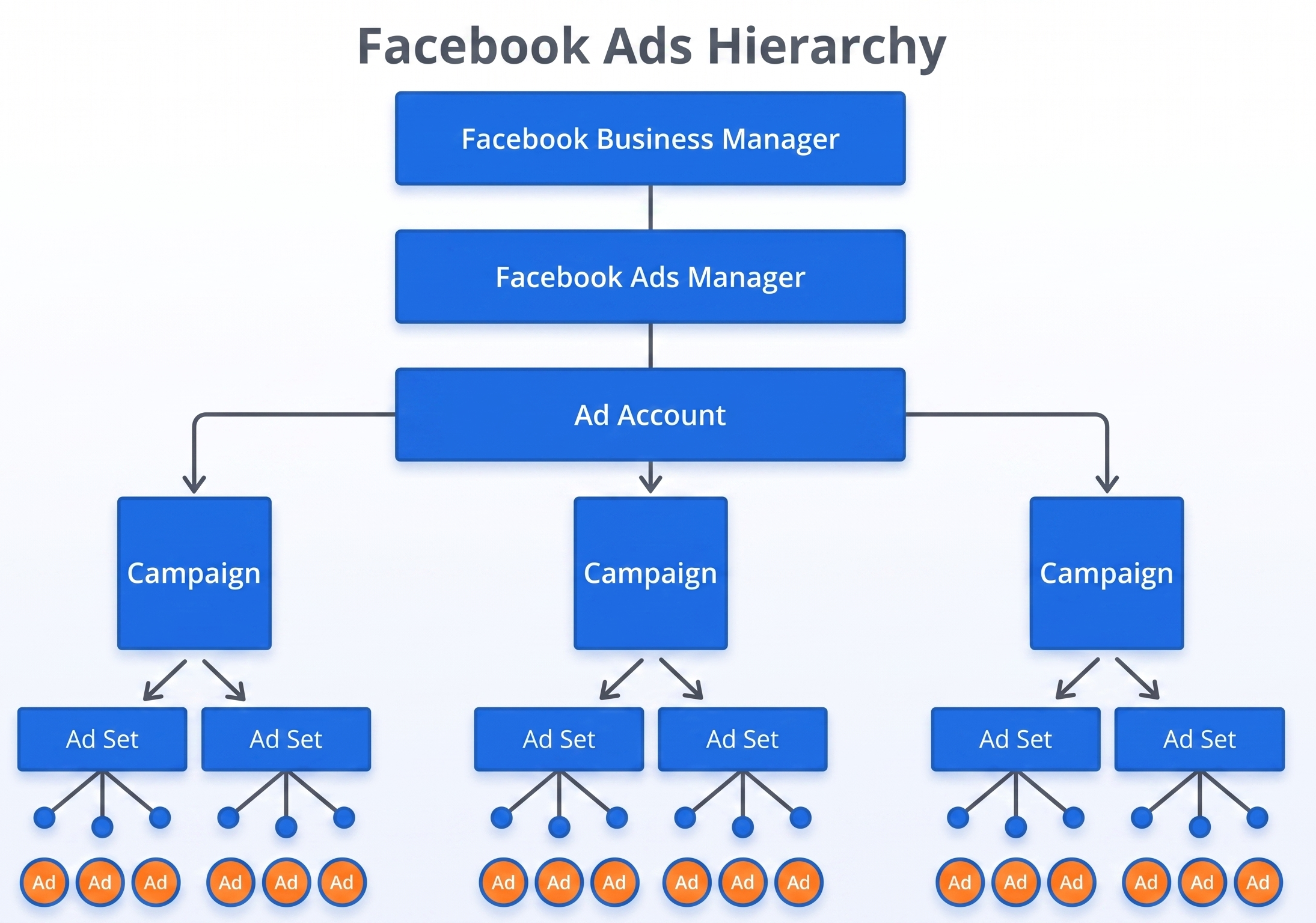
Before looking at campaigns and ad sets, it is important to understand that Meta Ads is built in layers.
Top to bottom, the hierarchy looks like this:
- Meta Business Suite
- Ad Accounts
- Campaigns
- Ad Sets
- Ads
Each layer has a different job. Most beginner mistakes come from trying to fix performance issues at the wrong level.
1. Meta Business Suite: The Foundation Layer
Meta Business Suite sits above everything else. It does not run ads directly. Instead, it controls ownership, access, and assets.
What Business Suite controls
• Business ownership
• User access and permissions
• Ad accounts
• Facebook Pages
• Instagram accounts
• Pixels and datasets
• Catalogs and domains
If you are advertising for a real business, you should always use Business Suite or Business Portfolio. Personal ad accounts are fragile and risky long term.
2. Ad Manager & Ad Account: Where Spend and Data Live
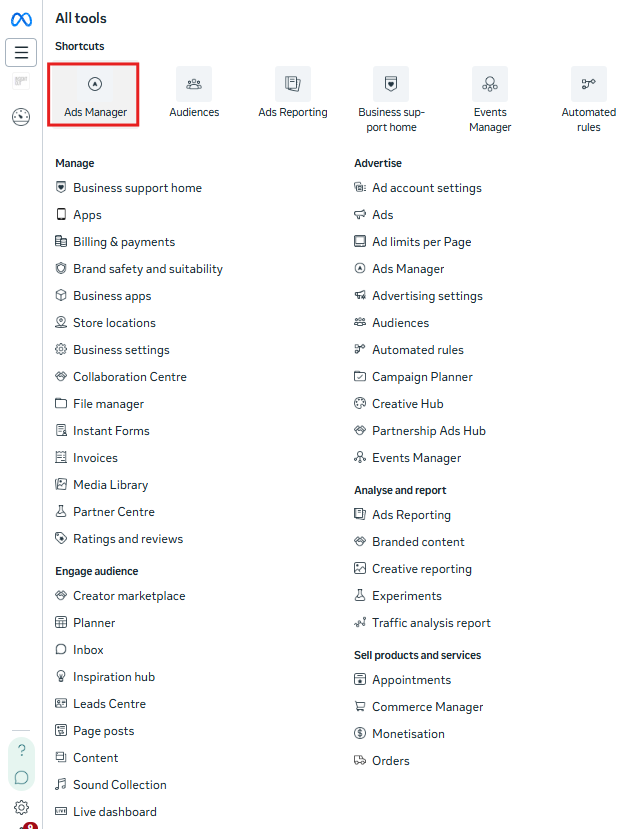
Ad accounts live inside Business Suite. This is where money is spent and where all performance data exists.
What lives at the ad account level
• Currency and timezone
• Payment methods
• Spending limits
• Pixels and conversion events
• Account level settings
One Business Suite can own multiple ad accounts, but campaigns do not share learning across accounts. Multiple ad accounts make sense if you are in a marketing agency with multiple clients, one account per client.
3. Campaign Level: Defining the Objective
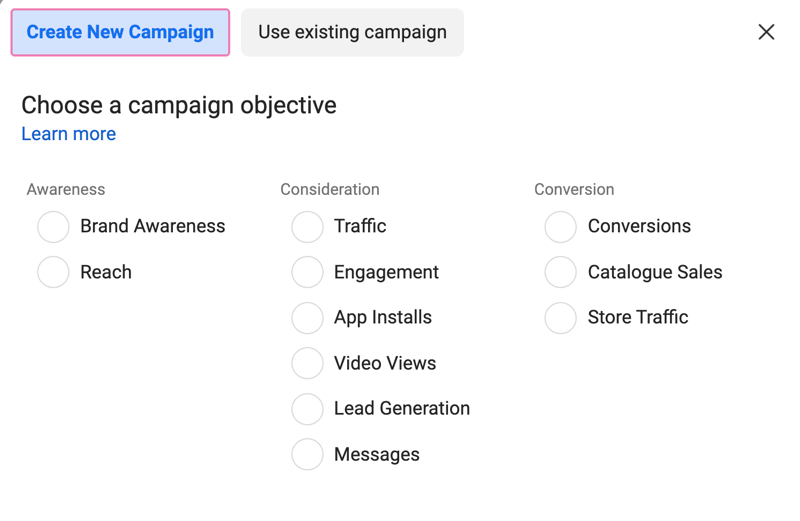
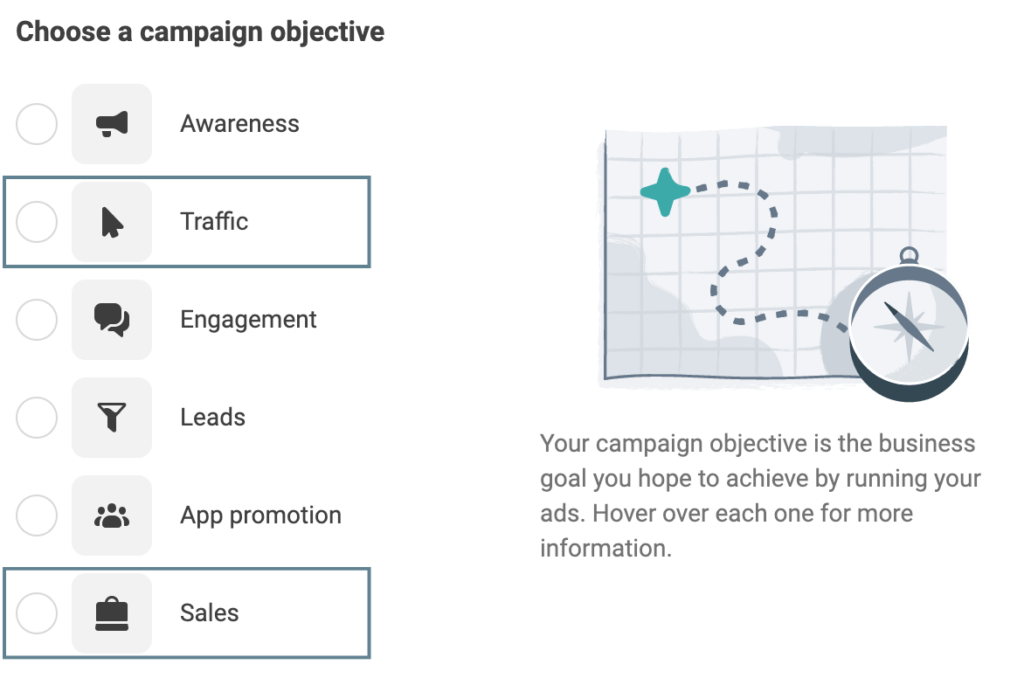
The campaign level tells Meta what you want to optimise for.
Examples include:
• Sales
• Leads
• Traffic
• Engagement
• Video views
Meta uses this objective to decide who to show ads to and how to prioritise delivery.
Common beginner mistake
Choosing Traffic or Engagement because clicks look cheap. This often leads to low quality users who never convert.
As a beginner, always align the campaign objective with your real business goal. If you want purchases, choose Sales. If you want leads, choose Leads.
Ad Set Level: Audiences, Delivery, and Learning
The ad set level is where most performance wins or losses happen. This is where you define who sees your ads and how Meta delivers them.
At a beginner level, the most important concept here is understanding audience intent, not just targeting mechanics.
4.1 The Three Core Audience Types in Meta Ads
All Meta Ads audiences fall into three functional buckets.
1. Prospecting Audiences
Prospecting audiences target people who have never interacted with your business before.
Examples:
• Broad targeting
• Interest based targeting
• Demographic targeting
These audiences are used to find new customers. They usually require stronger hooks, clearer value propositions, and more educational messaging.
If you want a structured way to build prospecting audiences properly, check out my article on Audience Targeting on Meta: How to Digitise Your Customer Personas.
2. Lookalike Audiences
Lookalike audiences are built from a source audience such as purchasers, leads, or website visitors.
Meta analyses your source data and finds people with similar behaviours.
Lookalikes sit between prospecting and retargeting. They are still cold audiences, but with higher intent because they resemble your existing customers.
For beginners, lookalikes often perform better than interest targeting once enough conversion data exists. More on Lookalikes here.
3. Retargeting Audiences
Retargeting audiences include people who already know your brand.
Examples:
• Website visitors
• Add to cart users
• Instagram or Facebook engagers
• Email lists
These users require different messaging. Less education, more urgency, stronger calls to action. More on retargeting here.
Retargeting is where efficiency usually comes from, but scale is limited. That is why structure matters so much.
4.2 How to Structure Ad Sets Using These Audience Types
Beginner friendly structure usually looks like this:
One campaign with a clear objective
Separate ad sets for:
1. Prospecting (usually 2-3 fo testing, depending on your budget)
2. Lookalike
3. Retargeting
Each ad set represents one audience intent stage. This keeps data clean and makes optimisation decisions easier. If results look weak, you immediately know whether the issue is acquisition (prospecting audience is weak), similarity quality, or conversion friction:
1. Acquisition (Prospecting): Your goal is to bring in fresh traffic. If performance is poor, focus on refining targeting and improving your ad creatives to appeal to the audience more effectively.
2. Similarity (Lookalike): Your goal is to target people who resemble your best customers. If these campaigns aren’t working well, re-examine the quality and size of the source audience. A high-quality lookalike audience will perform better.
3. Conversion (Retargeting): Your goal is to convert people who already interacted with your brand. If conversion is low, look for friction points in the user experience, such as slow-loading pages or confusing product descriptions.
This diagnostic approach is expanded in my guide- How to Analyse Meta Ads Data: A Smarter Way to Diagnose What Is Really Holding Back Performance.
4.3 Understanding Delivery and Learning
When you create an ad set, Meta's algorithm needs to "learn" about your audience and how to deliver your ads most effectively. During the learning phase, Meta collects data on how your ad performs with different segments of your target audience. This is essential because the platform needs enough data to start optimising delivery for better results.
What Impacts Delivery?
- Optimisation Event: This is the key action you want users to take. It could be a purchase, Add-to- cart, lead form submission, or link click. Choosing the right optimisation event is crucial because Meta will prioritise users who are more likely to complete the selected action. For example, if you choose Purchase as your optimisation event, Meta will try to find people who are likely to buy your product, not just click your ad.
- When starting a brand new account and there is little data from previous campaigns run, it is often times more cost-effective to optimise towards micro-conversions (e.g. Add to carts, page views etc.) to accumulate more data for Meta’s algorithm to learn before going straight into the end conversion goal (Purchases/ Sign ups). That’s where the optimisation event under the ad- set level comes in.
- When starting a brand new account and there is little data from previous campaigns run, it is often times more cost-effective to optimise towards micro-conversions (e.g. Add to carts, page views etc.) to accumulate more data for Meta’s algorithm to learn before going straight into the end conversion goal (Purchases/ Sign ups). That’s where the optimisation event under the ad- set level comes in.
- Placements: Placements determine where your ads will appear across Meta platforms (Facebook, Instagram, Messenger, etc.). You can either choose Automatic Placement, allowing Meta to select the best placements for you, or manually select Manual Placement if you want more control.
- I usually use Manual placements and choose only higher impact placements (such as feeds and stories) because I believe users will have greater attention and focus on those. I usually leave out the others like messenger, search, explore home, etc.
- I usually use Manual placements and choose only higher impact placements (such as feeds and stories) because I believe users will have greater attention and focus on those. I usually leave out the others like messenger, search, explore home, etc.
If an ad set is not getting enough conversions or has a narrow target audience, narrow placement, or difficult optimisation event to gain conversions towards, it may struggle to exit the learning phase. A longer learning phase means slower optimisation, and your ads may not perform as well.
What lives at the ad level
• Primary text
• Headline
• Description
• Creative format
• Call to action
Beginner mistake
Testing too many ideas at once with no system.
A simple rule:
Inside one ad set, test multiple ads that vary only one element at a time.
For example:
Same audience, same copy, different visuals OR
Same visual, different hooks
For a structured approach and exact levers to pull, check out my Meta Ads Creative Testing Playbook: A Step by Step Method.
Why Account Structure Matters More Than You Think
Good structure impacts performance in four key ways.
• Cleaner data
• Faster learning
• More stable scaling
• Better decision making
Messy structure hides problems. Clean structure reveals them.
A Simple Beginner Meta Ads Structure Example
Business Manager
One primary ad account
Campaign: Sales
Ad Set 1: Prospecting- audience 1
Ad Set 2: Prospecting- audience 2
Ad Set 2: Lookalike
Ad Set 3: Retargeting
Each ad set contains:
3 to 5 ads testing different hooks or creatives
This keeps learning consolidated while allowing controlled testing.
Final Takeaway
• Business Manager controls access and assets.
• Ad accounts control spend and data.
• Campaigns define goals.
• Ad sets define audiences and delivery.
• Ads deliver the message.
Once beginners understand these layers and how prospecting, lookalike, and retargeting audiences fit into structure, Meta Ads stops feeling chaotic and starts feeling logical.