-01.png)

1. Why Image Dimensions Matter in Google Ads
Image dimensions in Google Ads are critical for achieving optimal performance. The size of your ad impacts visibility, user interaction, and the overall effectiveness of your campaign. It’s important to use the right dimensions for each placement to ensure your ad appears crisp, clear, and visually engaging. If the size isn’t right, the ad may be cut off or appear distorted, which can hurt your ad's performance.
Unlike Meta Ads where ad dimensions are more straightforward, Google Ads image dimensions are more complicated because each channel on Google Ads (eg. Performance Max, Demand Gen etc.) requires different dimensions. In this article, I’ll summarise the top 3 channels that rely heavily on images: Performance Max (PMax), Demand Gen (previously known as Discovery), and Google Display Network (GDN).
2. PMax (Performance Max)
Dimensions Needed:
For Performance Max campaigns, Google Ads requires three image sizes:
- Landscape- Ratio 1.91:1 (1200 x 628 pixels): Ideal for most placements across Google, including Search, YouTube, and Display Network.
- Square- Ratio 1:1 (1200 x 1200 pixels): Optimized for mobile-first placements and some social media integrations.
- Vertical- Ratio 4:5 (960 x 1200 pixels): Note that this vertical dimension is different from the vertical dimension in Meta ads (which has a 9:16 ratio instead)
- Vertical- Ratio 9:16 (1080 x1920): Important for vertical placements like YouTube mobile ads and in-app advertisements. This dimension is the same as the vertical dimension on Meta.
No-Go Zones:
- Landscape Ads: Avoid placing text or logos too close to the edges of the ad. Google’s UI elements may overlap the top and bottom portions, hiding key content.
- Square and Portrait Ads: For both these formats, it’s crucial to keep critical visuals (like text and CTAs) away from the top and bottom areas to avoid being covered by interface elements, such as "Learn More" buttons or video controls.
Best Practices:
- Centralize Key Content: Ensure logos, text, and CTAs are placed towards the center of the image to avoid overlap with Google’s ad interface.
- Maintain Consistency Across Sizes: When designing for PMax, ensure that all three sizes are aligned in terms of messaging and branding so that your campaign remains cohesive across all placements.
3. Demand Gen
Dimensions Needed:
Demand Gen campaigns utilise the same four image sizes as PMax:
- Landscape- Ratio 1.91:1 (1200 x 628 pixels). Same as Pmax
- Square- Ratio 1:1 (1200 x 1200 pixels). Same as Pmax
- Vertical- Ratio 4:5 (960 x 1200 pixels). Same as Pmax, different from Meta
- Vertical- Ratio 9:16 (1080 x1920). Same as Pmax and Meta
Demand Gen campaigns also allow you to run carousel ads. These carousel ads uses three image sizes and has not rolled out the latest Vertical 9:16 dimension yet:
- Landscape- Ratio 1.91:1 (1200 x 628 pixels). Same as Pmax
- Square- Ratio 1:1 (1200 x 1200 pixels). Same as Pmax
- Vertical- Ratio 4:5 (960 x 1200 pixels). Same as Pmax, different from Meta
Note that the aspect ratio must be consistent across all cards. Meaning, if you only have a square dimension for one card, all other cards need to only have a square dimension. Ideally, carousel ads should have all 3 dimensions for all cards to ensure coverage across placements and channels.
No-Go Zones:
- Similar to PMax, ensure that key elements such as text or logos are not placed too close to the edges, particularly on portrait and square images, where the vertical UI elements (like the "Skip" button) can obscure the message.
- Avoid placing any critical content in the top or bottom 20% of your portrait images, as these areas may be obstructed by device-specific UI overlays.
- If you are using Vertical- Ratio 9:16 dimensions for YouTube ads, be mindful of the video safe zones.
Best Practices:
- Keep Visuals Simple: Demand Gen ads often perform best with bold, clean visuals. Don’t overcrowd the design, especially when using portrait format, as too much content in a small space can reduce impact.
Ensure Seamless Branding: Use all four dimensions (landscape, square, and portrait) to ensure your branding is consistent across placements. Keep messaging clear, with prominent CTAs to drive conversions.
4. Google Display Network (GDN)
Dimensions Needed:
For Google Display Network (GDN), there are 2 options to run ads here:
- Display Ad: The ad dimension you upload will determine the placement of the ad. You will need to upload multiple dimensions to have your ad qualify for appearing on more placements across the web. These are the most popular ones:
- Leaderboard (728 x 90 pixels): Great for wider desktop placements.
- Medium Rectangle (300 x 250 pixels): Versatile for both mobile and desktop devices.
- Wide Skyscraper (160 x 600 pixels): Ideal for vertical ad spaces, typically found on sidebars of websites.
- Mobile Banner (320 x 50 pixels): Optimized for mobile devices.
- Square (250 x 250 pixels): Smaller square dimensions that work well in smaller spaces.
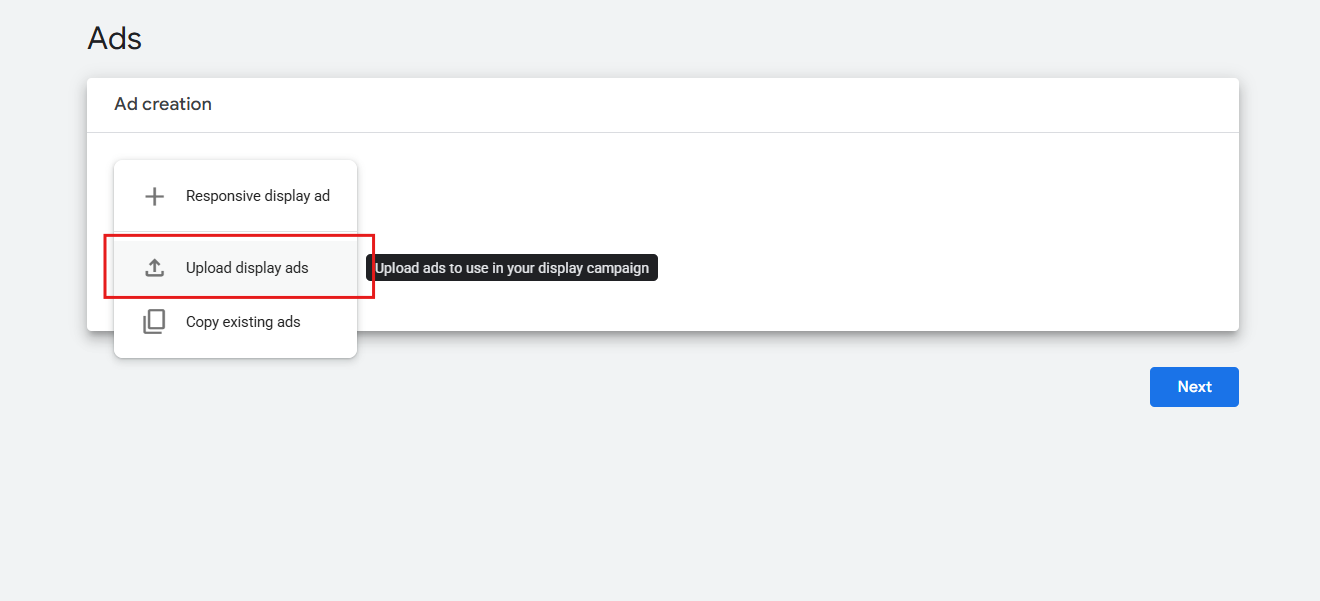
Do note that the default in your Google Ads campaign set up is responsive display ad. You will need to toggle to upload Display Ad instead to access these types of display ads.
- Responsive Display Ads: Google automatically adjusts the size, appearance, and format based on the available space. For responsive ads, you only need to upload a few assets (e.g., headlines, descriptions, images, and logos), and Google will dynamically create the most appropriate ad format. The dimensions for images on Responsive Display Ads on GDN are similar to those for Demand Gen:
- Landscape- Ratio 1.91:1 (1200 x 628 pixels). Same as Pmax and Demand Gen
- Square- Ratio 1:1 (1200 x 1200 pixels). Same as Pmax and Demand Gen
- Vertical- Ratio 9:16 (1080 x1920). Same as Pmax and Demand Gen (And Meta)
No-Go Zones:
- All GDN Sizes: Similar to the other channels, avoid placing important content (such as logos or text) too close to the edges, where they might get obscured by surrounding elements or cut off in certain placements.
- For Leaderboard and Skyscraper, make sure to position your text and visuals in a way that ensures they remain visible and don’t get hidden behind navigation bars or website side panels.
Best Practices:
- Use High-Quality, Simple Visuals: Since GDN placements can vary in size, use visuals that remain clear and impactful even when resized. Avoid cluttering your ad, especially in smaller sizes like the mobile banner or square.
- Responsive Ads for Flexibility: If you opt for responsive ads, ensure you upload high-quality assets that will work well across all device sizes. Responsive ads allow for greater flexibility in where your ad can appear and automatically adjust for optimal performance.
Test between Display ads and Responsive Display ads: We observe different results depending on the client, with some clients ads performing better with the original manual display ads compared to Responsive display ads. Hence, it’s best to do an A/B test to find which option might perform better.
Conclusion
By following the recommended dimensions and design best practices for each channel, you can optimize your Google Ads for greater visibility and engagement. Whether you’re creating ads for PMax, Demand Gen, or GDN, understanding where to place your key elements and how to adapt your ads for different sizes and formats will make a significant difference in campaign performance.