-01.png)


1. Quick Intro To Search And Shopping
Search campaigns
Search shows text ads when someone types a query into Google. It is:
- Intent based – the user is actively looking for something
- Triggered by keywords and match types
- Billed per click
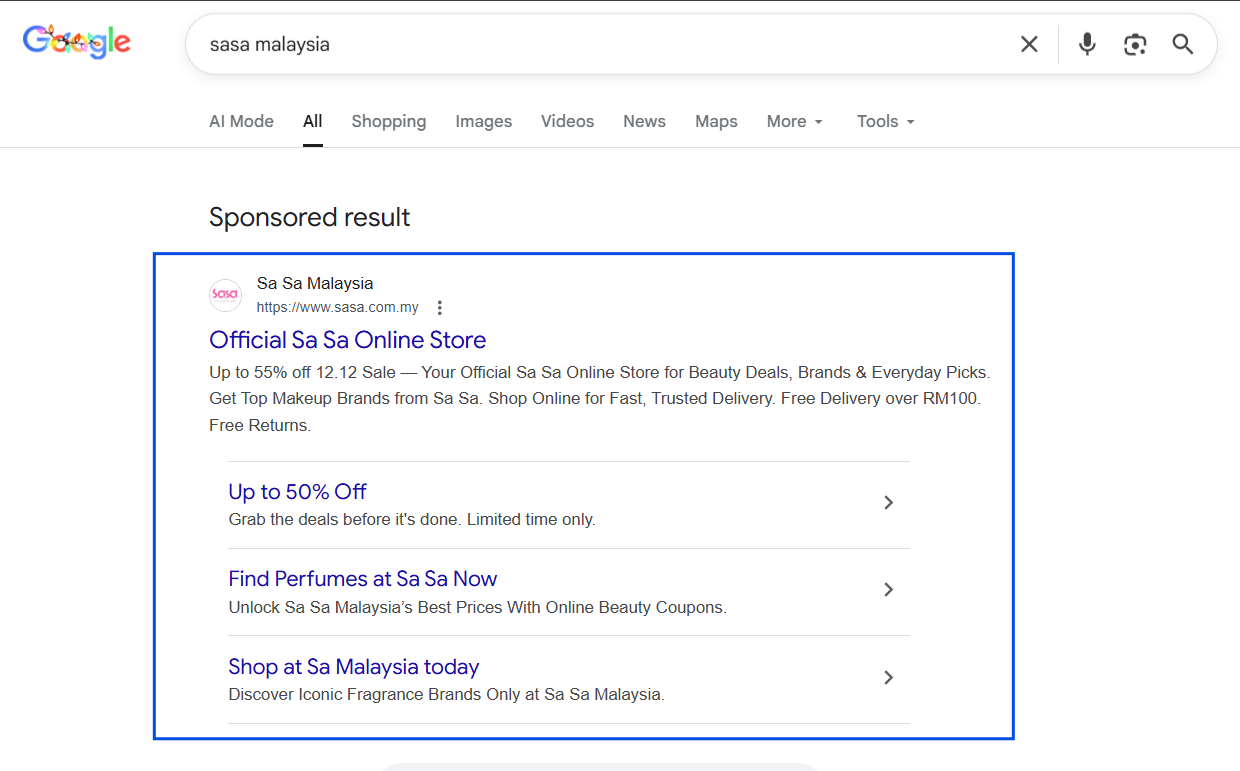
Example of a Search ad for the keyword “Sasa Malaysia”
We typically use Search to:
- Capture bottom funnel demand (brand terms, product terms, high intent queries)
- Test messaging around problems and solutions
- Defend brand traffic from competitors
Shopping campaigns
Shopping shows product tiles with image, price and merchant name. It is:
- Also intent based – triggered by product related queries
- Matched using your product feed instead of manual keywords
- Billed per click
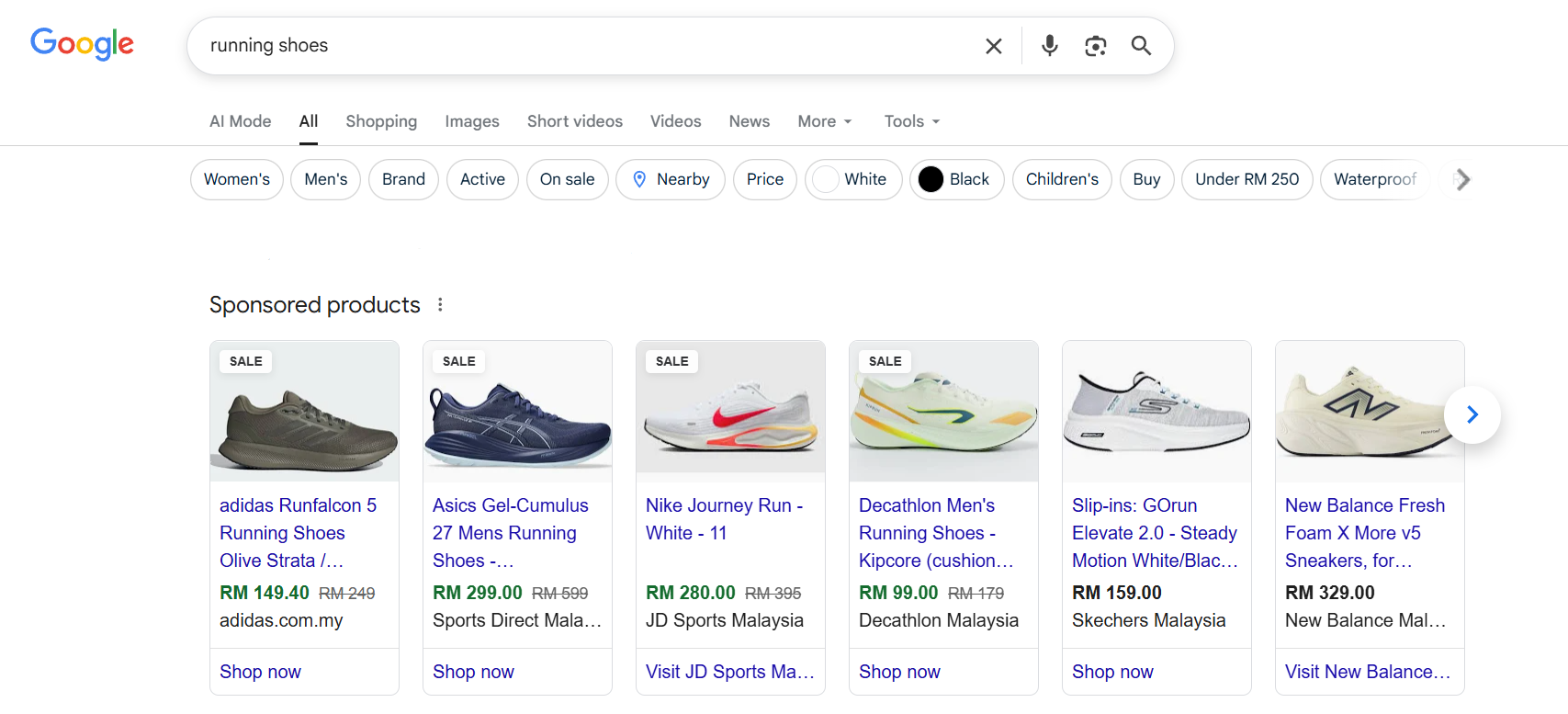
Example of Shopping Ads appearing for a search on “running shoes”.
We typically use Shopping to:
- Show your catalogue in the search results
- Compete side by side on price, image and title
- Drive high intent traffic to specific product pages
Search and Shopping often work together. Search captures queries that fit your keyword strategy. Shopping hoovers up product related intent and gives users a visual way to compare options. If you’re new to Search and Shopping, check out my guidebook for Google Ads newbies on how to set up Search and Shopping for eCommerce.
2. How Search And Shopping Differ From Meta, CPM Ads And Other Google Channels
I know many marketers who are confident with analysing Meta Ads data but fumble with Search or Shopping. The main reason is because they are using the wrong CPM mindset to analyse CPC campaigns.
2.1 CPC vs CPM world
Meta, YouTube awareness, display and most feed ads work primarily on:
- Impressions
- Reach and frequency
- CPM (cost per thousand impressions)
You are paying for the right to show up in front of someone, then hoping they care enough to click. If somebody sees the ad even without clicking on it, you still have to pay. While there are CPC metrics for Meta, YouTube and Display ads, they are a function of CPM. (CPM ÷ CTR x 1000= CPC)
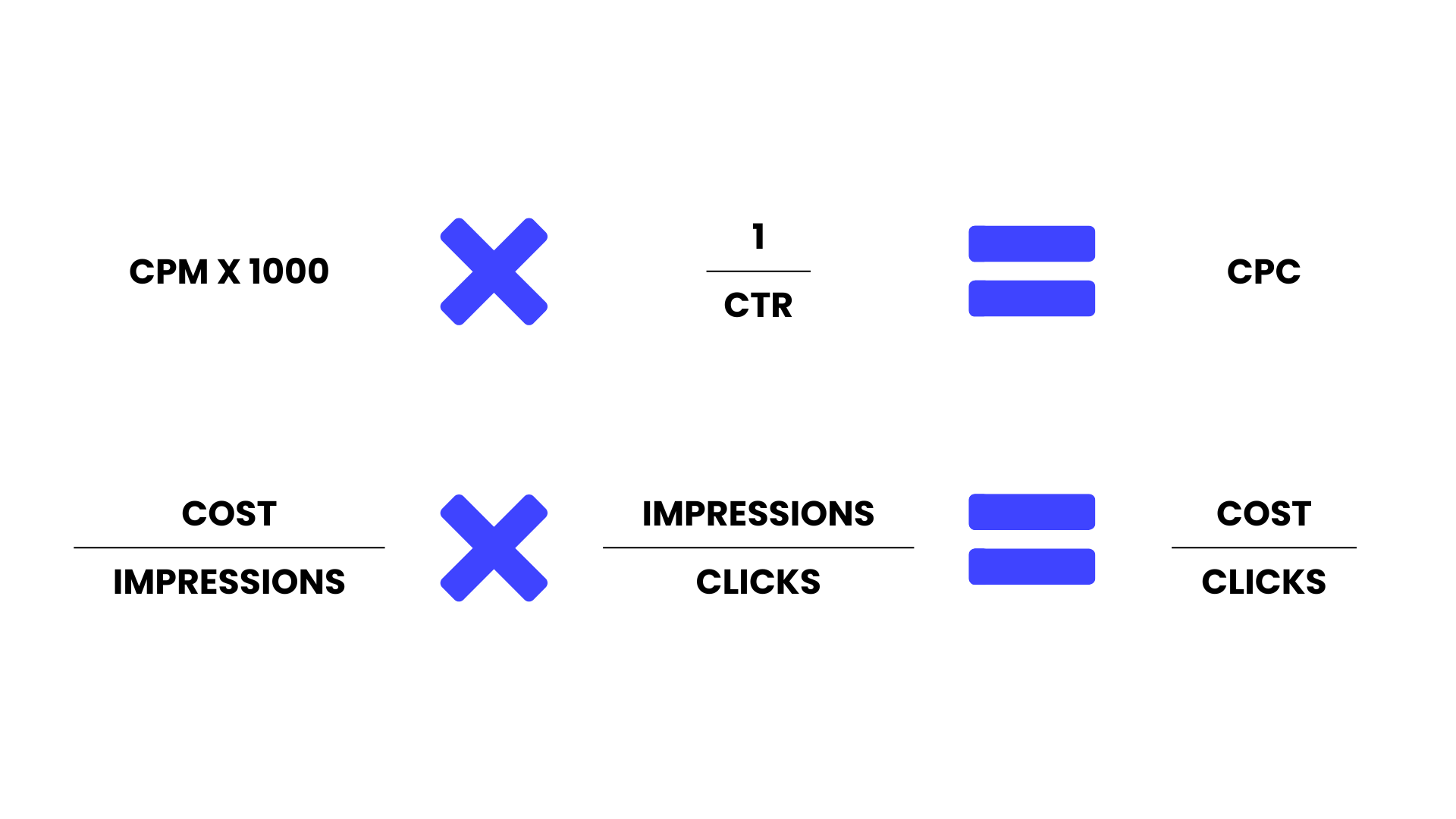
Search and Shopping are:
- CPC based – you pay only when someone clicks. CPM does not exist for Search and Shopping as you don’t pay for when people see the ad.
- Auction priced – CPC is set by a real time auction
- Intent filtered – your ads usually show when people are actively searching and you can’t show them to people as and when you’d like
This has a few big implications.
- CPC is a market outcome, not a knob you turn directly
- It is driven by your bid, competitors’ bids and your Quality Score.
- It is not directly linked to CTR. Higher CTR can improve Quality Score, which can reduce CPC over time, but there is no clean one to one line.
- Contrast this with CPM based platforms like Meta Ads of YouTube, CPC is directly linked to CTR, the higher your CTR, the lower your CPC simply because CPC is a function of CPM.
- It is driven by your bid, competitors’ bids and your Quality Score.
- You care more about what happens after the click
- Since you only pay when someone clicks, wasted impressions are less painful than wasted sessions.
- The real money burn happens when lots of people click and then do not engage or convert.
- Different Google channels behave differently even inside Google Ads
- Search and Shopping:
- High intent, CPC based, query matched.
- Performance Max, Discovery, YouTube:
- Mixed surfaces, more CPM style, used for discovery and awareness as well as conversions.
- Search and Shopping:
In this article we ignore the mixed inventory channels and focus only on Search and Shopping, where the See -> Click -> Land -> Convert journey is clearest.
2.2 Why Quality Score matters so much in CPC campaigns
Have you wondered why certain brands can show their ads above others?
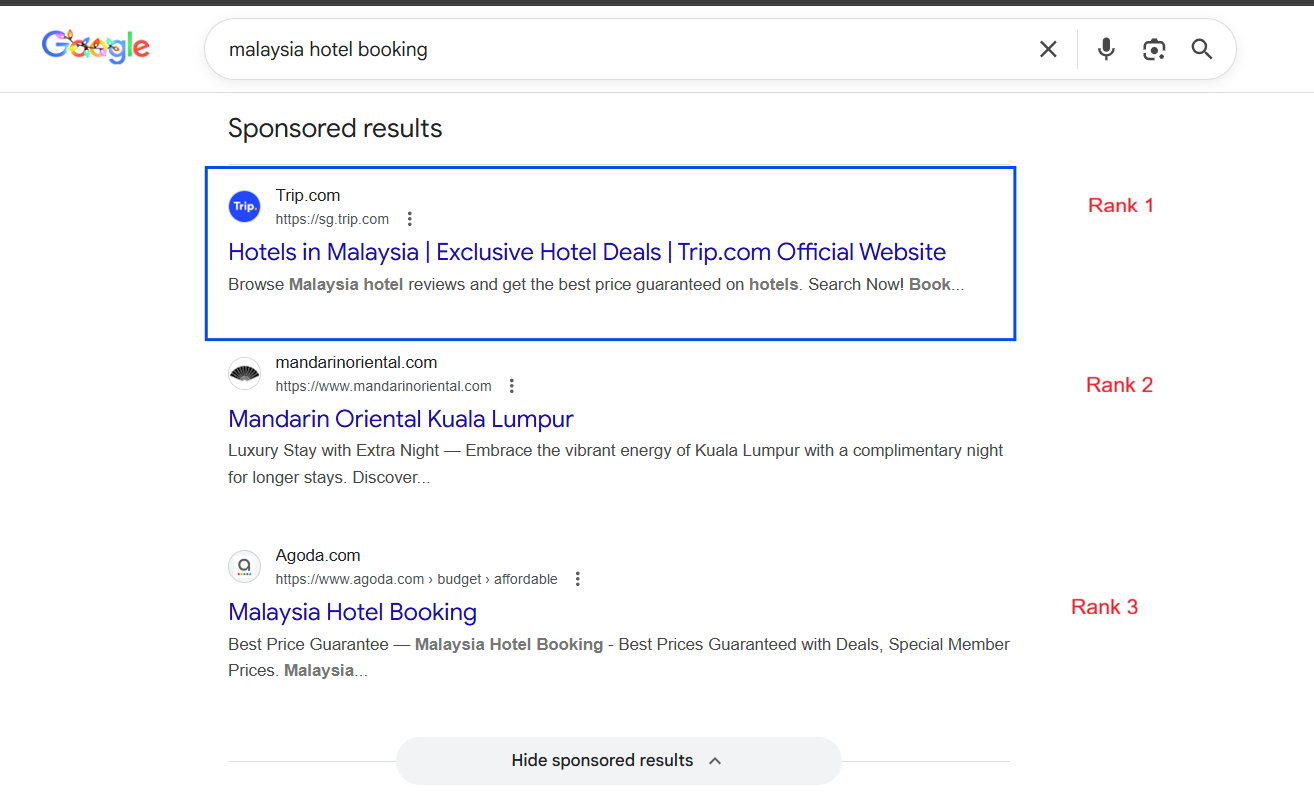
Google uses a concept called Ad Rank to decide who wins the auction and how much each winner actually pays. The simple version looks like this:
Ad Rank = Your bid multiplied by some measure of your quality and relevance
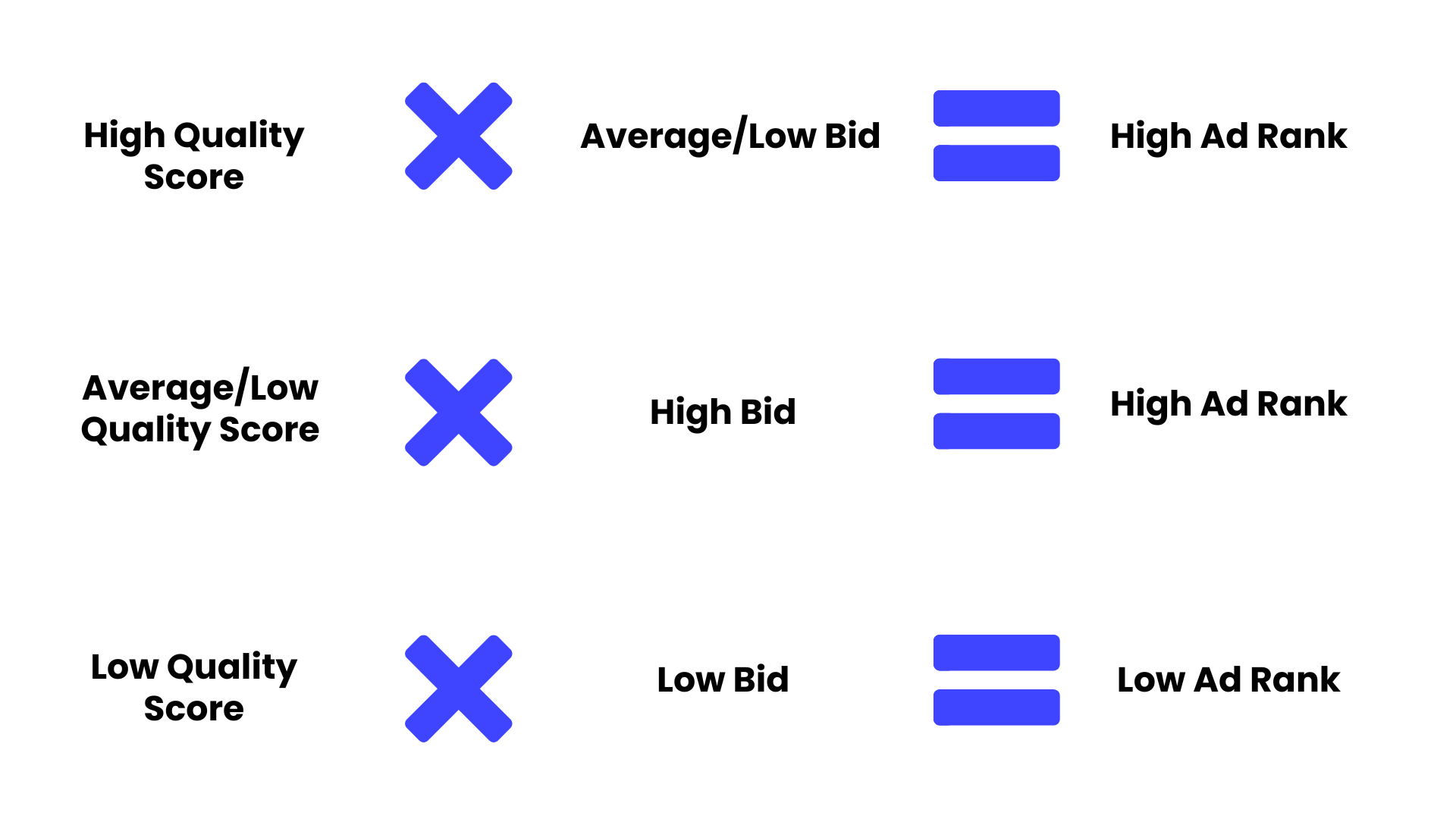
That’s why in Search and Shopping you are not paying a fixed price list for clicks. You are paying whatever the auction decides you need to pay to beat the next competitor, which is heavily dependent on your Quality Score.
Quality Score is Google’s shorthand for that quality and relevance. It’s so important to Google that they show good quality results so that users don’t switch to other search engines like Bing. That’s why Google uses Quality Score to reward and rank good ads.
For Search, Quality Score is broken into three main pieces:
- Expected CTR (how attractive your ad is in getting people to click)
- Ad relevance (whether the ad mentions the keywords you’re bidding for)
- Landing page experience (how long do people stay and browse on your site, suggesting that the ad was relevant to the search)
A few important things flow from this.
- Quality Score lets you win more with lower bids
- If your Quality Score is higher than a competitor, you can often show above them while bidding less.
- That is how small advertisers can still compete against big brands that throw money at the auction.
- If your Quality Score is higher than a competitor, you can often show above them while bidding less.
- Quality Score brings your CPC down over time
- The system effectively rewards ads that users like.
- Higher expected CTR and better landing pages improve your Quality Score.
- Better Quality Score means you can hold position while paying less per click than a low quality competitor.
- The system effectively rewards ads that users like.
- Bad Quality Score makes everything feel “randomly expensive”
- If your Quality Score is poor, you have to bid more just to stay visible.
- If your Quality Score is poor, you have to bid more just to stay visible.
CPC climbs, CPA climbs and it feels like “this niche is just too expensive”, when often the problem is relevance and experience, not the market itself.
So unlike CPM campaigns, you really need to care about Quality Score for CPC campaigns. Instead of obsessing over CPC in isolation, you:
- Make your ads more relevant to the searches you actually want.
- Align your landing pages closely with those ads and queries.
- Use the See and Click metrics to improve Quality Score, then let that pull CPC and CPA into a healthier place.
You still care about bids and budgets, but Quality Score is what decides whether those bids work hard or work poorly for you.
3. How To Analyse Search And Shopping Data Using See -> Click -> Land -> Convert
The core idea:
- Performance metrics tell you if each stage is doing its job.
- Cost metrics tell you how expensive that performance is.
For Search and Shopping, the main metrics line up like this:
Performance metrics
- See ->
- Search impression share
- Auction insights
- Quality Score signals
- Search impression share
- Click ->
- CTR
- Search terms quality
- CTR
For Shopping: click share and product level CTR
- Land ->
- Web quality
- Engagement metrics in GA4 (engagement rate, time on site, pages per session, add to cart, etc)
- Web quality
- Convert ->
- Conversion rate
- Conversion volume
- Conversion rate
Cost metrics
- CPC ->
- Determined by the auction, affected by bids and Quality Score
- Not directly controlled by CTR
- Determined by the auction, affected by bids and Quality Score
- Cost per session / per engaged user
- Cost per conversion (CPA)
- ROAS or cost of sale
Let us go stage by stage.
3.1 See: Are You Actually Showing Up To The Right People
Here we are answering:
When relevant searches happen, do we actually appear, and how strong is our position in the auction?
3.1.1 Key performance metrics for See
For both Search and Shopping:
- Search impression share
- Percentage of total eligible impressions you actually received.
- Low impression share means you are barely present in that auction.
- Percentage of total eligible impressions you actually received.
- Search lost impression share (budget and rank)
- Lost due to budget: the system wanted to show you more often, but your budget was too low.
- Lost due to rank: competitors outbid or outperformed you on relevance and Quality Score.
- Lost due to budget: the system wanted to show you more often, but your budget was too low.
Note: if you don’t see it on your dashboard, you’ll need to add this metric in any customizing your columns
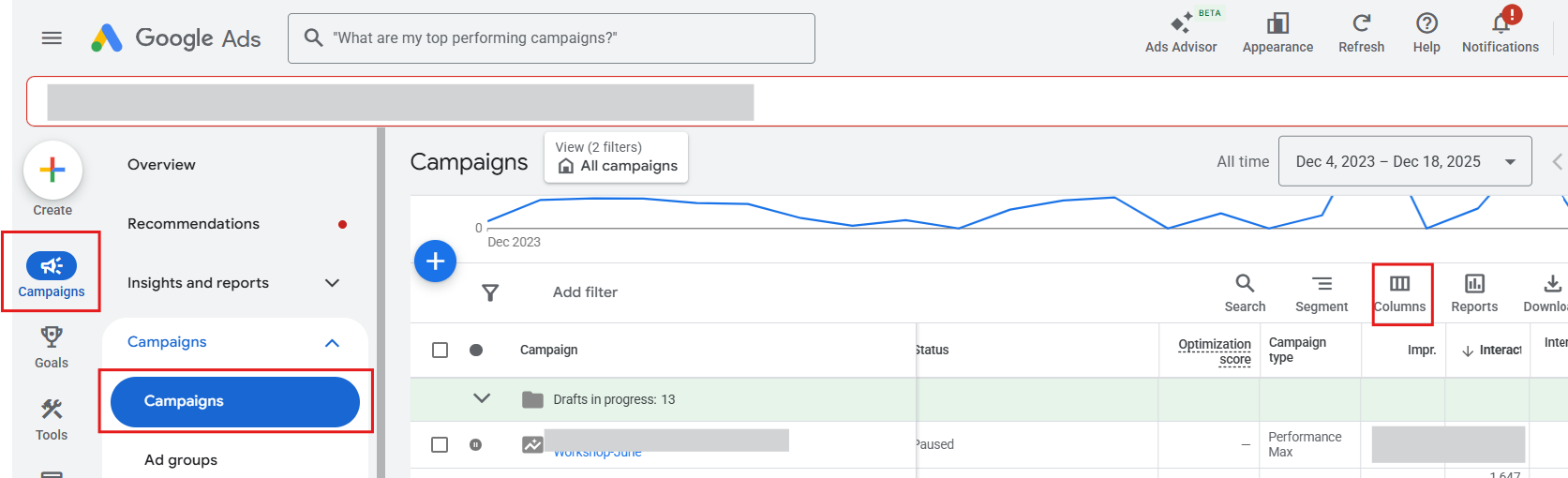
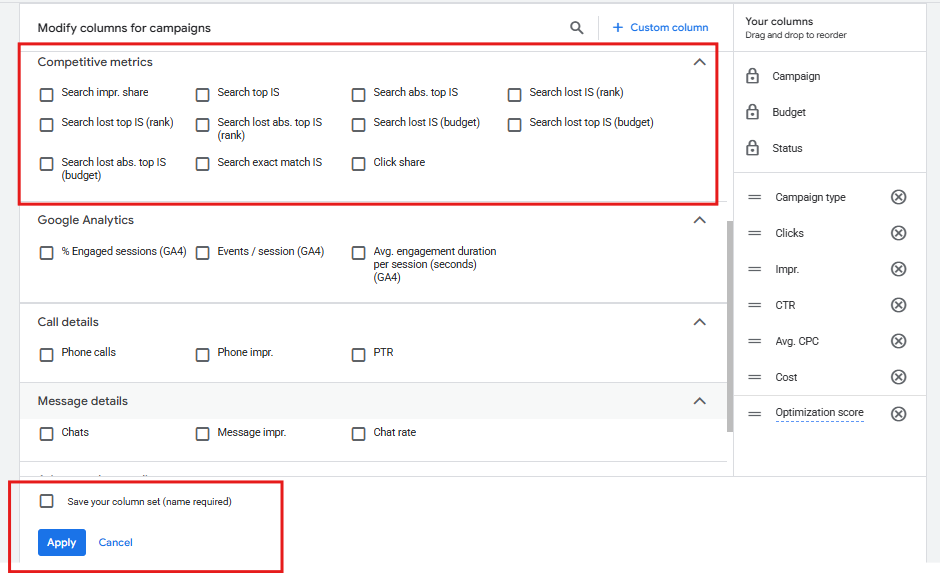
From Columns> open up Competitive Metrics and include all the relevant search impr. Share metrics> Save your columns
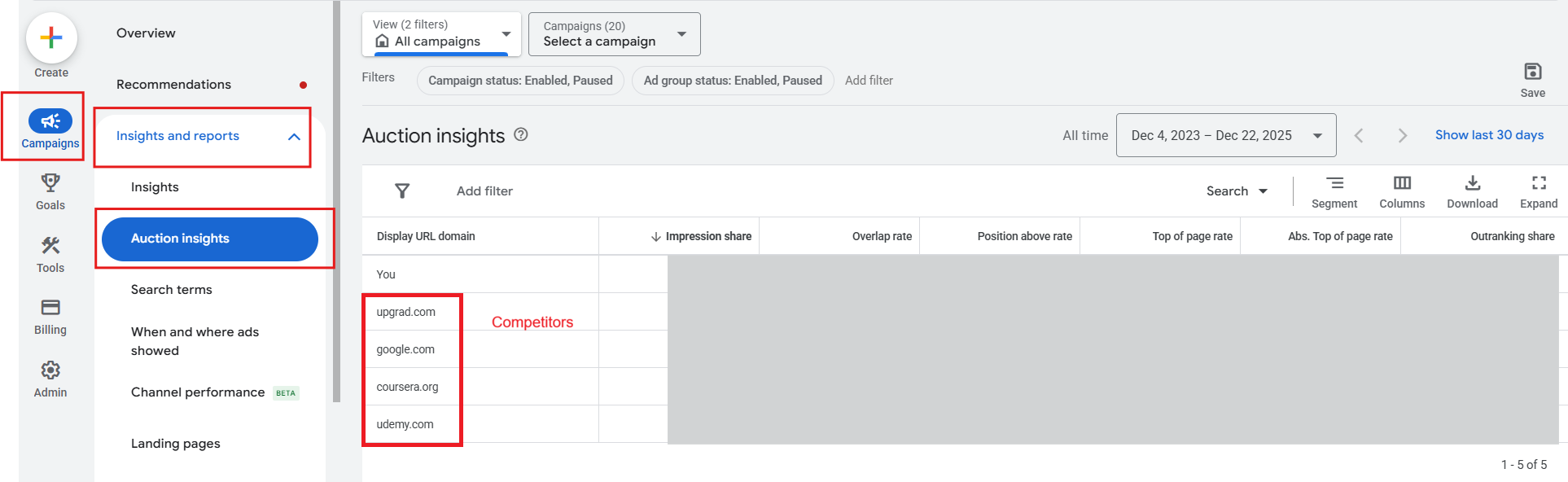
- Auction insights
- Overlap rate: how often you appear in the same auctions as specific competitors.
- Position above rate: how often they rank above you when you both show.
- Top of page rate and absolute top of page rate: how often you show on top positions.
- Overlap rate: how often you appear in the same auctions as specific competitors.
- Quality Score (Search only)
- Expected CTR
- Ad relevance
- Landing page experience
- Expected CTR
Note: if you don’t see it on your dashboard, you’ll need to add this metric in any customizing your columns at the Keyword level
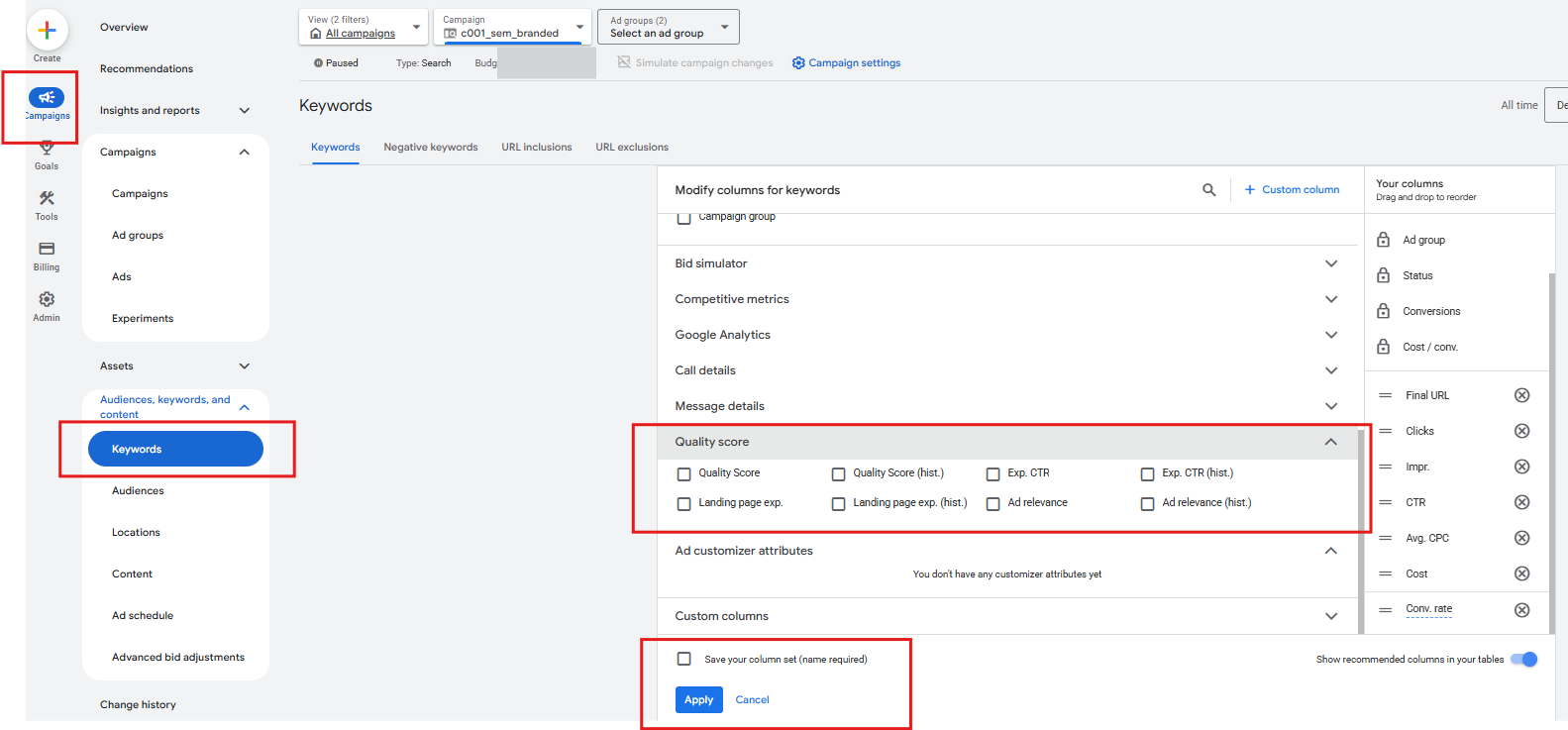
For Search, Quality Score sits behind a lot of what you see in impression share and Auction insights. A higher Quality Score boosts your Ad Rank, which lets you show more often and in stronger positions without always needing to increase bids.
For Shopping, you do not see Quality Score in the same way, but the concept is similar: product feed quality, relevance and landing page experience affect your effective rank.
3.1.2 How to interpret See metrics
Common patterns:
- Low impression share, most loss due to budget
- Your campaigns are working, but you are underfunded.
- Action: consider increasing budgets on proven campaigns to get more volume, as long as CPA or ROAS is acceptable.
- Your campaigns are working, but you are underfunded.
- Low impression share, most loss due to rank
- You are being outcompeted in the auction.
- Actions:
- Improve Quality Score with more relevant ads and better landing pages.
- Tighten keyword themes or product group structure.
- Raise bids carefully for your highest value terms or products.
- Improve Quality Score with more relevant ads and better landing pages.
- You are being outcompeted in the auction.
- Auction insights show one or two competitors consistently above you
- Decide whether you want to aggressively compete in those auctions or move to slightly different angles or terms where competition is softer.
- Decide whether you want to aggressively compete in those auctions or move to slightly different angles or terms where competition is softer.
At this stage, you are not changing bids just to “improve impression share”. You are asking:
- Is it strategically important to show up more here
- If yes, do I fix relevance first, or do I accept higher CPC for more volume
Once you have sufficient impressions (people seeing your ad), you can move on to analyse clicks.
3.2 Click: Are Enough People Choosing You
Here the question is:
Out of the people who saw your ad or product tile, are enough of them clicking?
3.2.1 Key performance metrics for Click
For both Search and Shopping:
- CTR (click through rate)
- By campaign, ad group or product group.
- Also by device and match type where relevant.
- By campaign, ad group or product group.
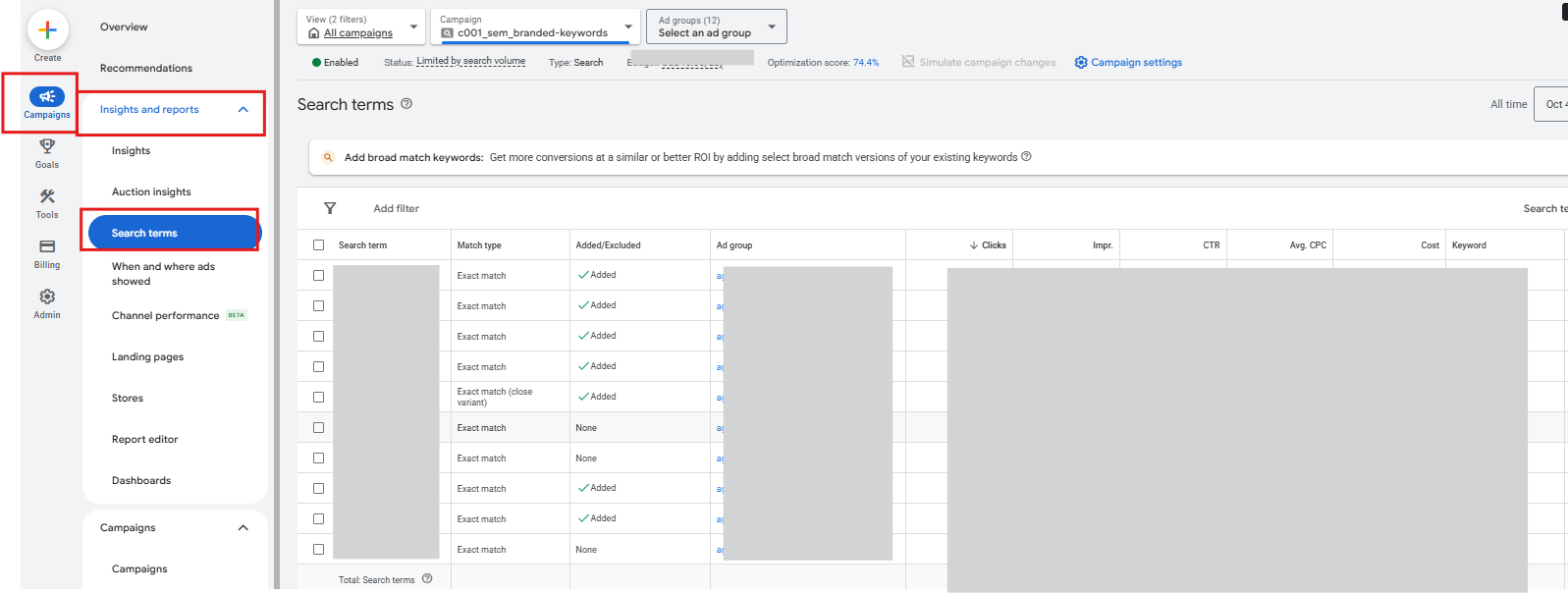
- Search terms report
- For Search: shows what people actually typed, not just your keywords.
- For Shopping: shows the queries that triggered your product tiles.
- For Search: shows what people actually typed, not just your keywords.
Extras for Shopping:
- Click share
- Share of clicks you receive compared with the total number you were eligible to get.
- Low click share with decent impression share usually means other listings are more attractive.
- Share of clicks you receive compared with the total number you were eligible to get.
3.2.2 How CTR relates to cost
Important reminder:
- CTR is a performance signal, not a cost metric.
- Higher CTR can improve expected CTR and Quality Score.
- Better Quality Score can reduce CPC for the same bid, but it’s not guaranteed. (Unlike CPM campaigns, an improvement in CTR instantly results in decreased CPC)
Actual CTR is one of the biggest inputs into expected CTR, which is a core part of Quality Score. If your ad gets clicked more than competing ads on the same query, Google learns that users like you and is more willing to give you cheaper clicks for the same position.
So CTR affects cost indirectly via Quality Score, but you should never optimise for CTR in isolation. A very high CTR from low intent clicks still loses money in the long run.
3.2.3 How to read Click metrics
Typical scenarios:
- Low CTR and search terms look messy
- You are matching too many irrelevant or vague queries.
- Actions:
- Add negative keywords to cut junk queries. Be sure to use exact match and phrase match so that you keep your negative keywords tight.
- You are matching too many irrelevant or vague queries.
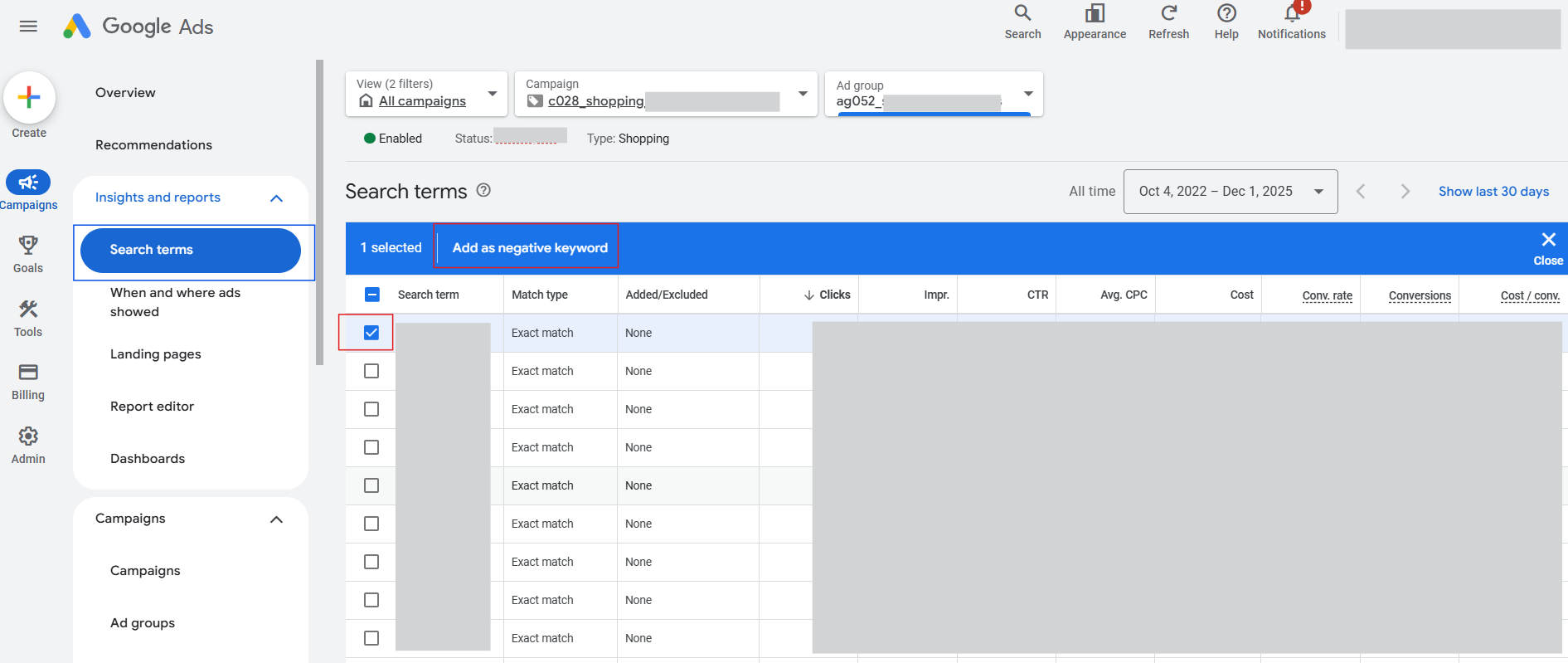
- Tighten match types and group similar intent into cleaner ad groups. I generally advise to start off with exact or phrase match keywords, and only cautiously branch into broad match keywords if I have enough capacity to do a daily if not bi-weekly cleaning of my search terms.
- For Shopping, improve titles and attributes so your products match more specific intent.
- Low CTR but search terms look relevant
- The intent is right, but your ad or tile is not attractive.
- Actions for Search:
- Rewrite headlines to mirror the exact phrasing users see in their search. (i.e. mirror the search terms, not just keywords. you can see what the actual searches are under Insights > Search terms)
- Highlight unique value: price, guarantee, delivery, social proof.
- Rewrite headlines to mirror the exact phrasing users see in their search. (i.e. mirror the search terms, not just keywords. you can see what the actual searches are under Insights > Search terms)
- Actions for Shopping:
- Sharpen product titles and images.
- Check if your prices are clearly higher than competitors on the results page.
- Sharpen product titles and images.
- The intent is right, but your ad or tile is not attractive.
- High CTR but poor quality downstream
- The ad promise is strong, but people regret clicking once they land.
- The ad promise is strong, but people regret clicking once they land.
This is a Land problem, not a Click problem, which we cover next.
3.3 Land: Is Your Website Doing Its Job
You have already paid for the click. Now the question is:
Do people behave like real prospects once they land on your site?
This is where Google Ads and GA4 have to work together. If you have not set up GA4 with your Google Ads account, check out this article on how and why you should do it, pronto.
3.3.1 Key performance metrics for Land
You will usually look at GA4 for this stage:
- Engagement rate
- Average engagement time per user
- Pages per session (the higher, the more your users are browsing through your site)
- Key events like view item, add to cart, begin checkout
You can break these down by:
- Campaign
- Source / medium and campaign
- Landing page
- Device
For Shopping, pay extra attention to product detail page stats. The tile sends them straight to a product, so that page needs to carry a lot of weight.
3.3.2 What “web quality” looks like
High web quality:
- High engagement rates- Users stay long enough to read or browse.
- High pages/ session- They visit multiple relevant pages.
- High volume of key events recorded- They trigger key micro conversions like add to cart, enquiry or email signup.
Low web quality:
- Very short session durations.
- High exit rate from the landing page.
- Few scrolls or interactions.
Do note that “high” or “low” is subjective and depends on both the nature of your keywords and your historical performance. A brand search keyword/campaign will generally have much stronger web quality than an unbranded search campaign because branded search users usually have higher purchase intent. You should be comparing campaigns/ keywords of similar nature and always compare to historical data where available.
3.3.3 How to interpret Land metrics
Patterns:
- Good See and Click metrics, weak Land metrics
- You are bringing the right people in, but the site is not pulling its weight.
- Possible causes:
- Slow site, especially on mobile.
- Confusing layout or too many distractions.
- Weak product value proposition compared to what the ad promised.
- Slow site, especially on mobile.
- Actions:
- Fix speed and responsiveness.
- Simplify above the fold content to focus on one main call to action.
- For Shopping, ensure the product page matches the exact product shown in the ad (price, image, variant).
- Fix speed and responsiveness.
- You are bringing the right people in, but the site is not pulling its weight.
- Average CTR but good engagement on site
- You may be undervaluing the campaign. The traffic you do get is high quality.
- Actions:
- Test new ad creatives to improve CTR.
- Test new ad creatives to improve CTR.
- You may be undervaluing the campaign. The traffic you do get is high quality.
Increase bids modestly for that campaign if you are losing impression share due to budget to increase the amount of impressions, clicks and eventually lands.
3.4 Convert: Are You Turning Sessions Into Revenue
At this final stage, the focus is:
Out of the people who land and engage, what proportion actually converts, and at what cost?
3.4.1 Key performance metrics for Convert
In Google Ads:
- Conversion rate
- Number of conversions
- Conversion value
- Conversion value per click
In GA4:
- Purchase events or lead submissions
- Assisted conversions where Search and Shopping help other channels close
3.4.2 Cost metrics for Convert
This is where cost finally matters directly:
- CPA (cost per acquisition)
- Return on ad spend (ROAS) or cost of sale
- Profit per order if you have margin data
Your decisions at this stage are usually:
- Scale
- Optimise
- Cut
3.4.3 How CPC fits into the whole story
CPC sits between Click and Convert as a cost metric. The overall cost per conversion or return on ad spend is affected by 2 factors- CPC and Conversion rates.
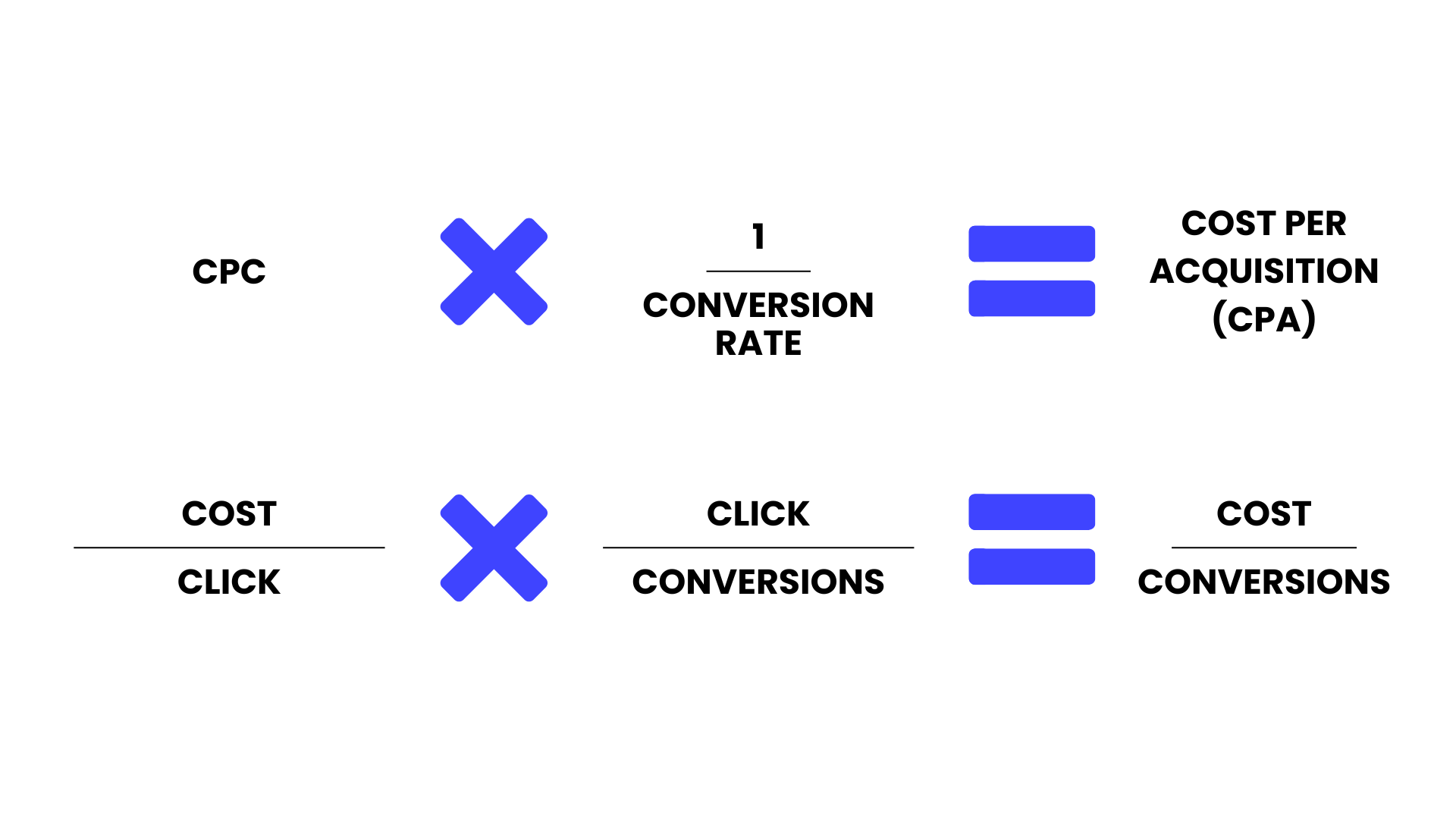
CPC is a proxy of how expensive it is to get the traffic, and conversion rate is a proxy of how convincing your product and site is in getting that traffic to convert. The lower your CPC and the higher your conversion rate, the cheaper your cost per acquisition.
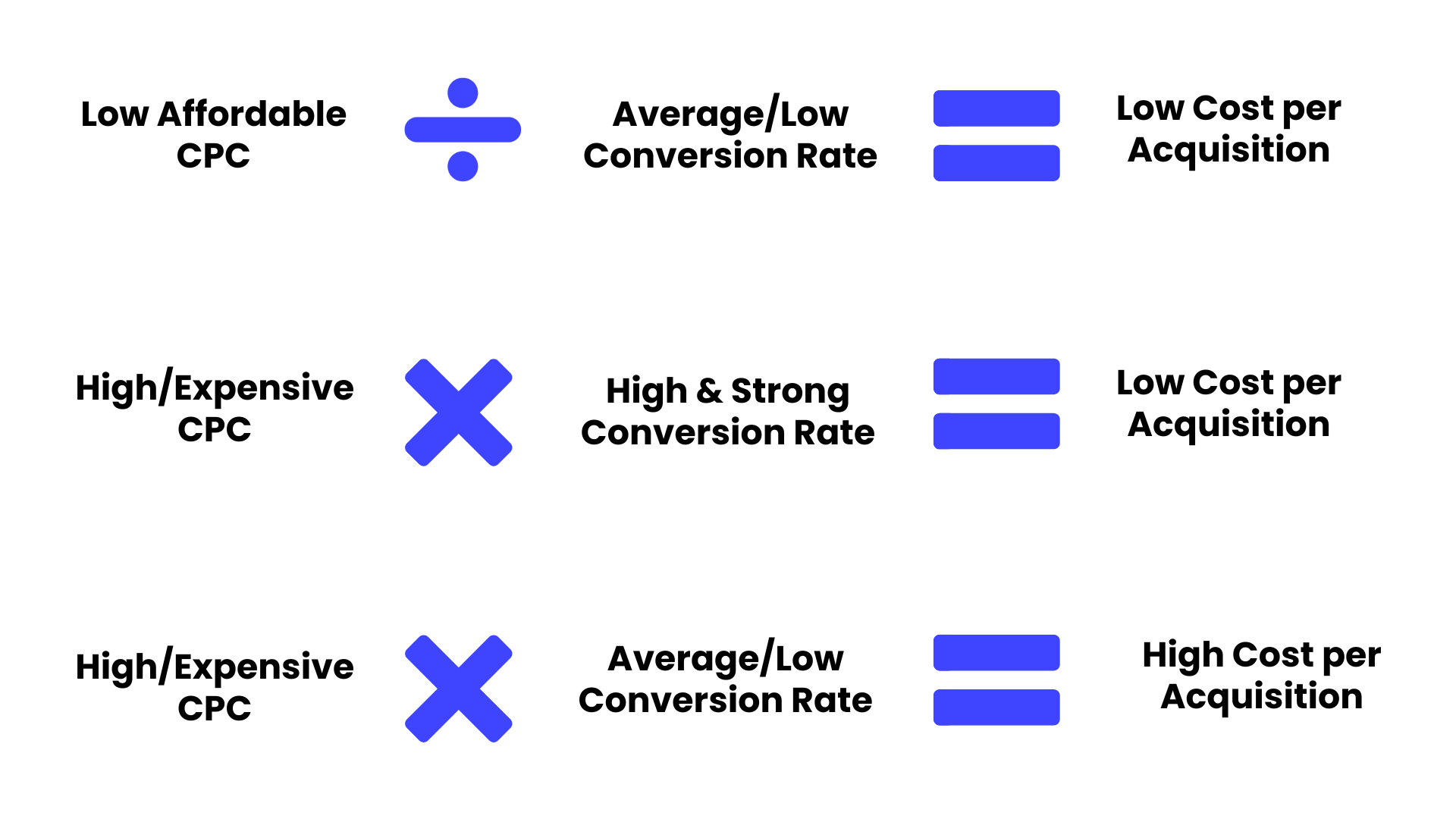
As a recap on CPC- as mentioned earlier in section 2.1 and 2.2,
- CPC is determined by bids, competition and Quality Score.
- It is not directly “set” by CTR or conversion rate, although both influence Quality Score and bid strategies over time.
- To lower CPC, you either lower your bids or improve relevance and user experience. That is why creative work and landing page work are just as important as bid changes in CPC campaigns.
Now with that in mind, combining CPC and conversion rates, what really matters in practice are these combinations:
- High CPC with strong conversion rate and good ROAS
- Expensive clicks, but still profitable overall.
- If margins allow, you can safely scale.
- Expensive clicks, but still profitable overall.
- High CPC with strong conversion rate but low ROAS
- Expensive clicks but not profitable.
- Lower CPC to manage costs by either:
- Excluding expensive keywords (try to rank for them organically via SEO instead)
- or improving quality score (ad relevance and landing page quality) to improve costs.
- Expensive clicks but not profitable.
- High CPC with weak conversion rate (and low ROAS)
- You are overpaying for traffic that does not convert.
- Actions:
- Fix targeting (refine keywords to be more closely aligned to intent, and clean irrelevant search terms)
- Fix Land issues first (make landing page more engaging and value proposition on landing page stronger)
- Then adjust bids or bid strategy if CPA is still too high.
- You are overpaying for traffic that does not convert.
- Low CPC with low conversion rate (and low ROAS)
- Cheap traffic that does nothing is still a waste.
- Actions:
- Cut low intent keywords or product groups.
- Cut low intent keywords or product groups.
- Cheap traffic that does nothing is still a waste.
Use negatives and better feed optimisation to tighten relevance.
3.5 Putting It All Together: How To Diagnose Problems Step By Step
When performance dips or you are auditing an account, walk through this sequence:
- See stage check
- Is impression share healthy for our core terms and products
- Are we losing more to budget or to rank
- Are competitors consistently outranking us in auction insights
- Is impression share healthy for our core terms and products
If See is broken, fix relevance and rank first, then revisit budgets and bids. People need to first see your ad before they can make any other action.
- Click stage check
- Is CTR reasonable for branded vs non branded terms (always compare to historical, segregating branded vs non branded as branded CTR will always be significantly higher)
- Are search terms aligned with what we actually want to pay for
- For Shopping, are our tiles competitive on price and appearance
- Is CTR reasonable for branded vs non branded terms (always compare to historical, segregating branded vs non branded as branded CTR will always be significantly higher)
If Click is broken, refine queries and creatives before worrying about CPC.
- Land stage check
- For the traffic we do get, is web quality healthy
- Are users engaging, viewing products, adding to cart
- Are there specific landing pages that underperform
- For the traffic we do get, is web quality healthy
If Land is sub-optimal, work with the website, not just the ads.
- Convert and cost check
- Given all of the above, is our conversion rate acceptable
- Is CPA within our target/ Is ROAS or cost of sale within profitable range
- If no- Which factor needs to be optimized? Conversion rate (Website/ offer/ value prop) or CPC (bidding/ keywords)?
- Given all of the above, is our conversion rate acceptable
Once you do this a few times, Search and Shopping stop feeling like a random collection of metrics. You are simply walking the user journey step by step, checking:
- Did they see us
- Did they choose us
- Did the site do its job
- Did we get paid enough to justify what we spent
And you treat CPC, CPA and ROAS as the outcomes of many small choices, not magic levers to pull in isolation.